How to Protect Any App with Authentik and Traefik Forward Auth
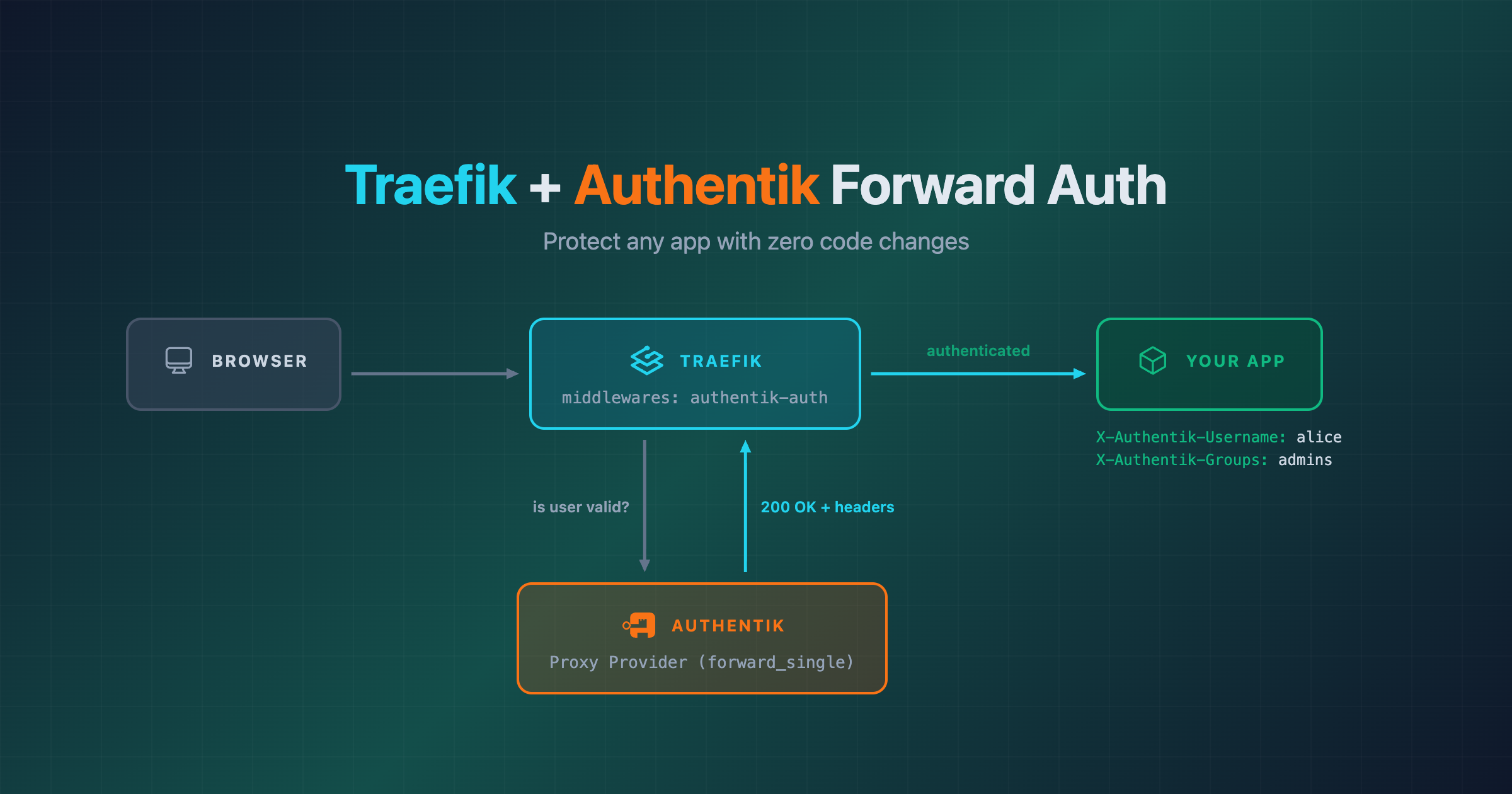
You have a web app. You want to put it behind authentication without touching the app’s code. Traefik and Authentik make this possible with forward authentication – Traefik asks Authentik “is this user allowed?” before forwarding the request to your app.
This guide walks through the full setup with a simple whoami container as the demo app. The examples use Docker Swarm, but a Docker Compose equivalent is included for each step – the only difference is providers.swarm vs providers.docker and @swarm vs @docker. By the end, unauthenticated requests get redirected to Authentik’s login page, and authenticated requests arrive at your app with identity headers like X-Authentik-Username and X-Authentik-Groups injected automatically.
The End Result
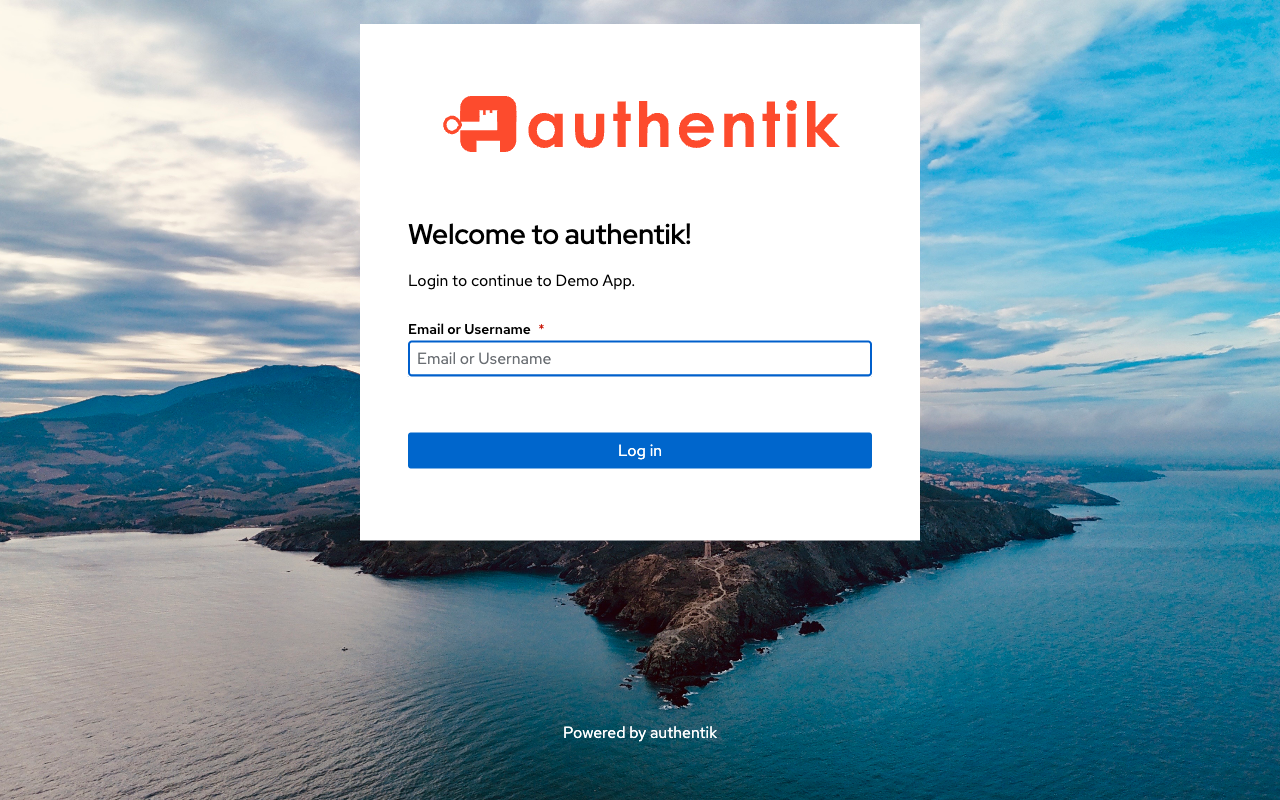
Visit https://app.localhost – Traefik intercepts the request, sees no session, and redirects to Authentik:
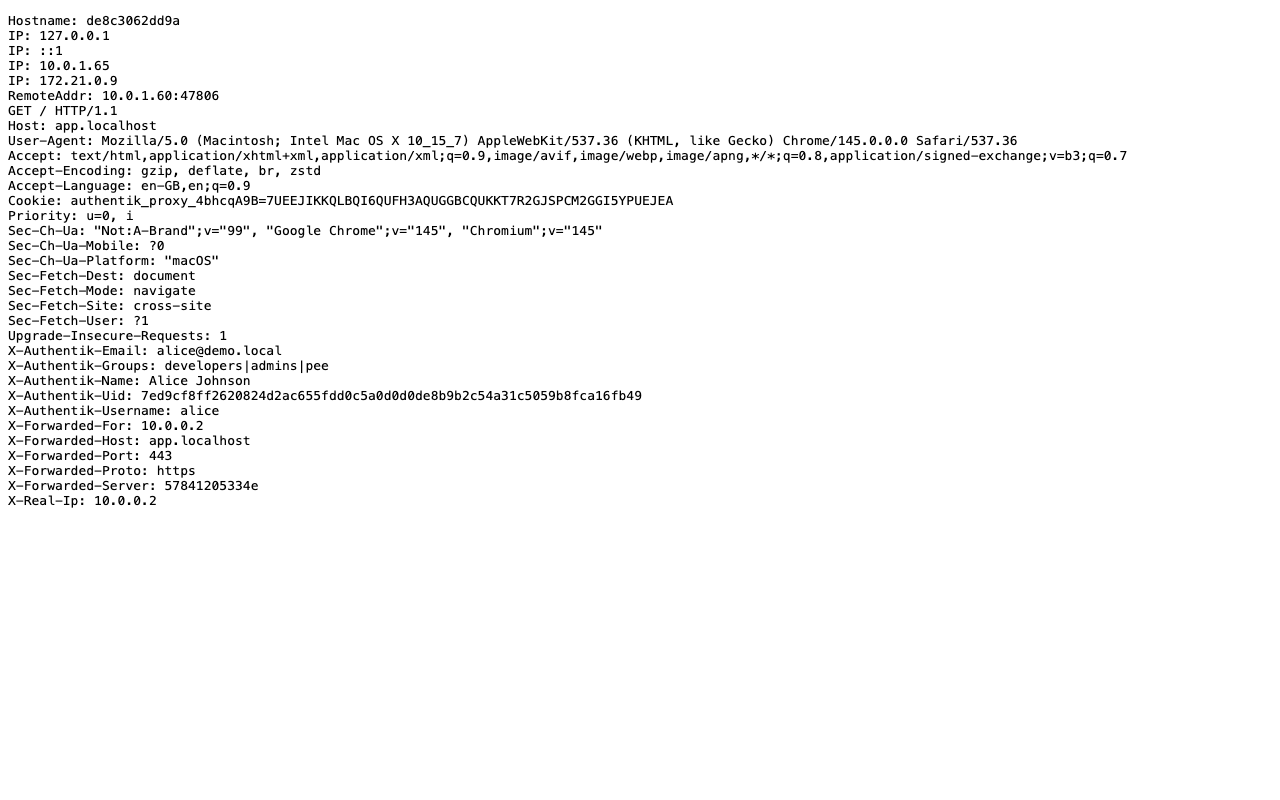
After logging in, Traefik forwards the request to the app with Authentik’s identity headers injected:
How Forward Auth Works
- User requests
https://app.localhost - Traefik’s
forwardauthmiddleware sends a sub-request to Authentik’s outpost:http://authentik_server:9000/outpost.goauthentik.io/auth/traefik - If the user has no valid session, Authentik returns 401 – Traefik redirects the user to Authentik’s login page
- User authenticates on Authentik, gets a session cookie
- On the next request, Authentik’s outpost returns 200 with identity headers (
X-Authentik-Username, etc.) - Traefik copies those headers to the request and forwards it to the app
- Your app sees the request with user identity injected – no auth code needed in the app itself
The key insight: your app never handles authentication. It just reads headers.
What You Need
- Docker with Compose (or Swarm)
- Traefik as reverse proxy
- Authentik as identity provider
- Your app (we’ll use
traefik/whoamias the example)
Part 1: Traefik Setup
Traefik needs to be running with the Swarm provider enabled. Here’s the relevant config (this example uses Swarm mode with Traefik v3’s dedicated providers.swarm – for regular Docker Compose, use providers.docker instead and drop the deploy blocks):
services:
  traefik:
    image: traefik:v3.6
    command:
      - "--providers.swarm.endpoint=unix:///var/run/docker.sock"
      - "--providers.swarm.exposedByDefault=false"
      - "--providers.swarm.network=shared_proxy"
      - "--entrypoints.web.address=:80"
      - "--entrypoints.web.http.redirections.entryPoint.to=websecure"
      - "--entrypoints.websecure.address=:443"
    ports:
      - "80:80"
      - "443:443"
    volumes:
      - /var/run/docker.sock:/var/run/docker.sock:ro
    networks:
      - proxy
    deploy:
      placement:
        constraints:
          - node.role == manager

networks:
  proxy:
    external: true
    name: shared_proxy
The important bits: exposedByDefault=false (we opt-in per service with traefik.enable=true), and a shared network that all services connect to. In Traefik v3, Swarm has its own dedicated provider (providers.swarm) instead of the v2 providers.docker.swarmMode=true flag.
Not using Swarm? If you’re running plain Docker Compose, swap providers.swarm for providers.docker and drop the deploy blocks. The Traefik config becomes:
services:
  traefik:
    image: traefik:v3.6
    command:
      - "--providers.docker.endpoint=unix:///var/run/docker.sock"
      - "--providers.docker.exposedByDefault=false"
      - "--providers.docker.network=shared_proxy"
      - "--entrypoints.web.address=:80"
      - "--entrypoints.web.http.redirections.entryPoint.to=websecure"
      - "--entrypoints.websecure.address=:443"
    ports:
      - "80:80"
      - "443:443"
    volumes:
      - /var/run/docker.sock:/var/run/docker.sock:ro
    networks:
      - proxy

networks:
  proxy:
    external: true
    name: shared_proxy
And all middleware references use @docker instead of @swarm (e.g. authentik-auth@docker). The rest of the setup is identical.
Part 2: Authentik Configuration
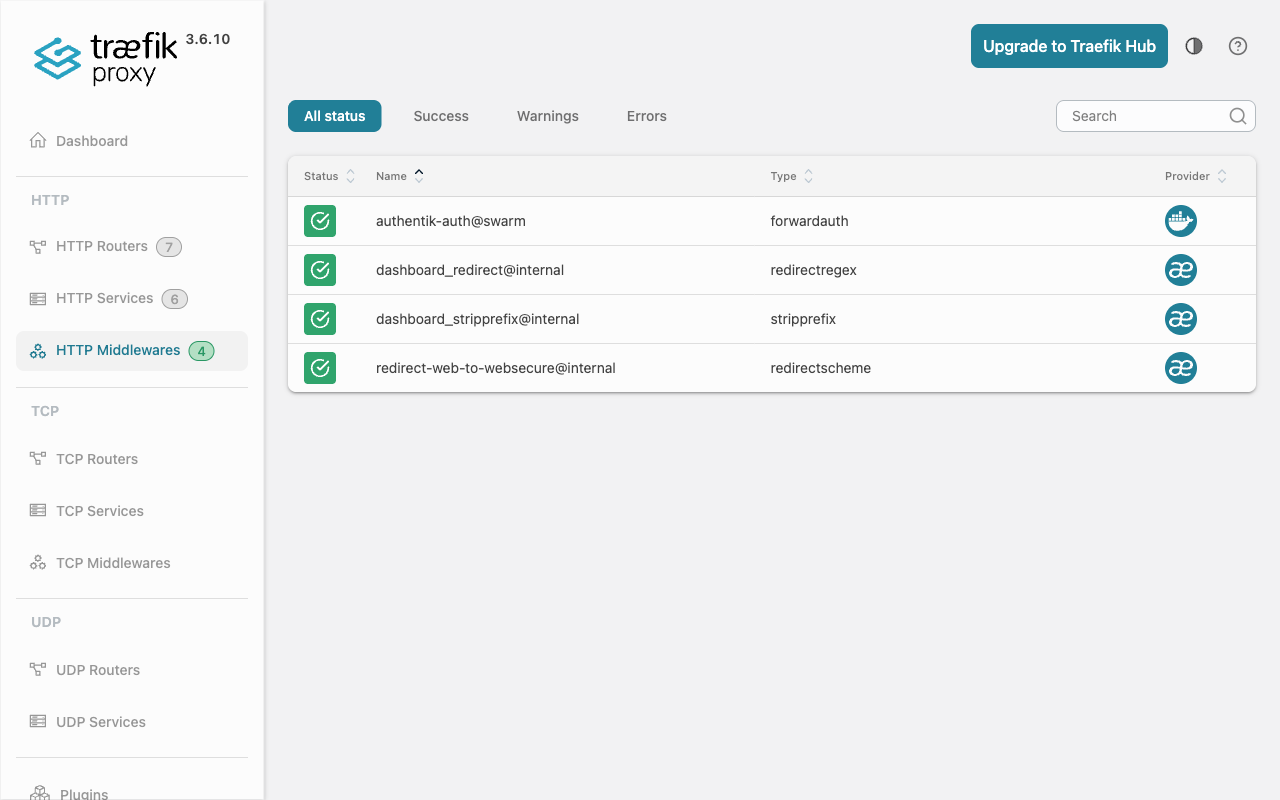
The Authentik server container defines the ForwardAuth middleware that Traefik uses. This goes in Authentik’s deploy labels:
# On the Authentik server service:
deploy:
  labels:
    - "traefik.enable=true"
    # Authentik UI/API
    - "traefik.http.routers.authentik.rule=Host(`auth.localhost`)"
    - "traefik.http.routers.authentik.entrypoints=websecure"
    - "traefik.http.routers.authentik.tls=true"
    - "traefik.http.services.authentik.loadbalancer.server.port=9000"
    # Embedded outpost: handles /outpost.goauthentik.io on app.localhost
    - "traefik.http.routers.authentik-outpost.rule=Host(`app.localhost`) && PathPrefix(`/outpost.goauthentik.io`)"
    - "traefik.http.routers.authentik-outpost.entrypoints=websecure"
    - "traefik.http.routers.authentik-outpost.tls=true"
    - "traefik.http.routers.authentik-outpost.service=authentik"
    # ForwardAuth middleware (reusable by any app)
    - "traefik.http.middlewares.authentik-auth.forwardauth.address=http://authentik_server:9000/outpost.goauthentik.io/auth/traefik"
    - "traefik.http.middlewares.authentik-auth.forwardauth.trustForwardHeader=true"
    - "traefik.http.middlewares.authentik-auth.forwardauth.authResponseHeaders=X-authentik-username,X-authentik-groups,X-authentik-email,X-authentik-name,X-authentik-uid"
This does three things:
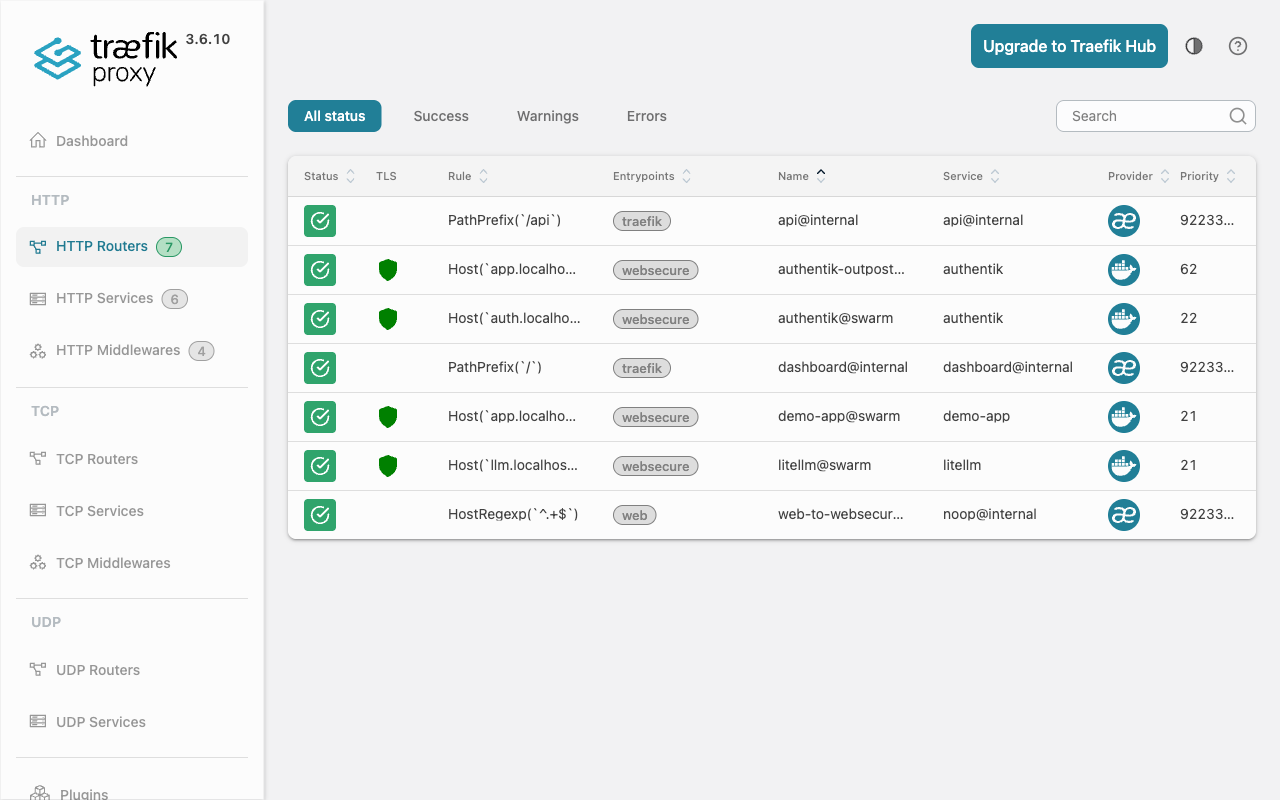
- Routes
auth.localhostto Authentik’s UI on port 9000 - Routes
/outpost.goauthentik.ioon app.localhost to Authentik – needed for the OAuth callback - Defines a reusable
authentik-authmiddleware – any service can referenceauthentik-auth@swarmto require authentication
Create a Proxy Provider in Authentik
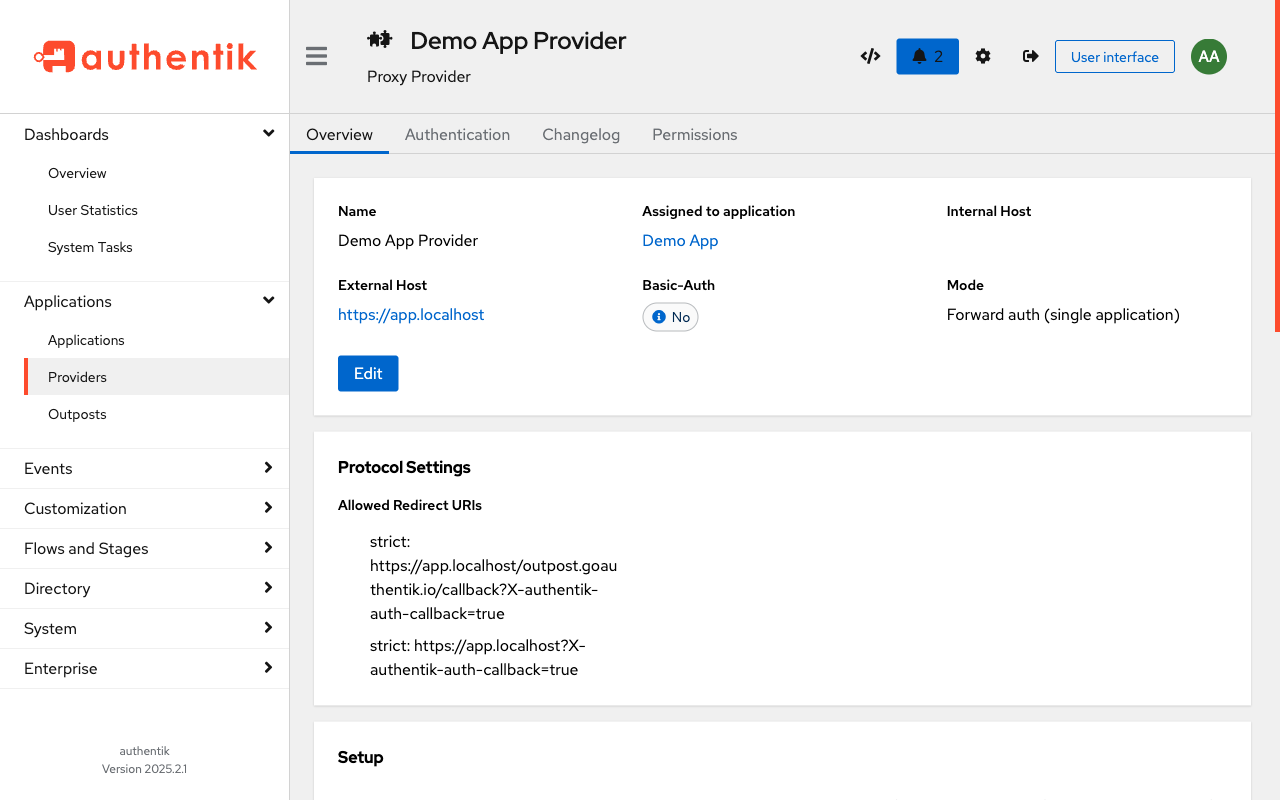
In the Authentik admin UI, create a Proxy Provider with these settings:
| Setting | Value |
|---|---|
| Name | Demo App Provider |
| Authorization flow | default-provider-authorization-implicit-consent |
| External host | https://app.localhost |
| Mode | Forward auth (single application) |
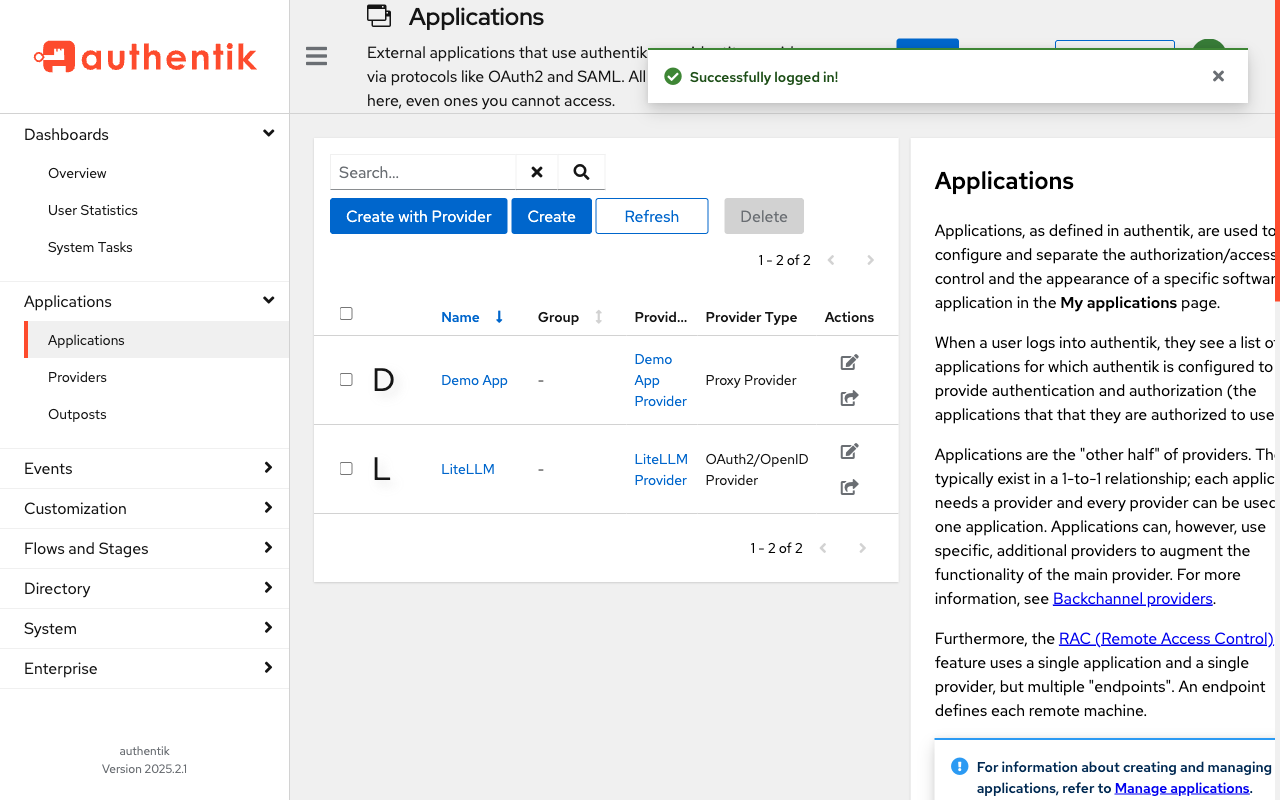
Then create an Application linked to this provider:
| Setting | Value |
|---|---|
| Name | Demo App |
| Slug | demo-app |
| Provider | Demo App Provider |
| Launch URL | https://app.localhost |
Configure the Embedded Outpost
Go to Applications → Outposts and edit the authentik Embedded Outpost. Add the Demo App Provider to its provider list, and set:
| Setting | Value |
|---|---|
| authentik_host | https://auth.localhost |
| authentik_host_browser | https://auth.localhost |
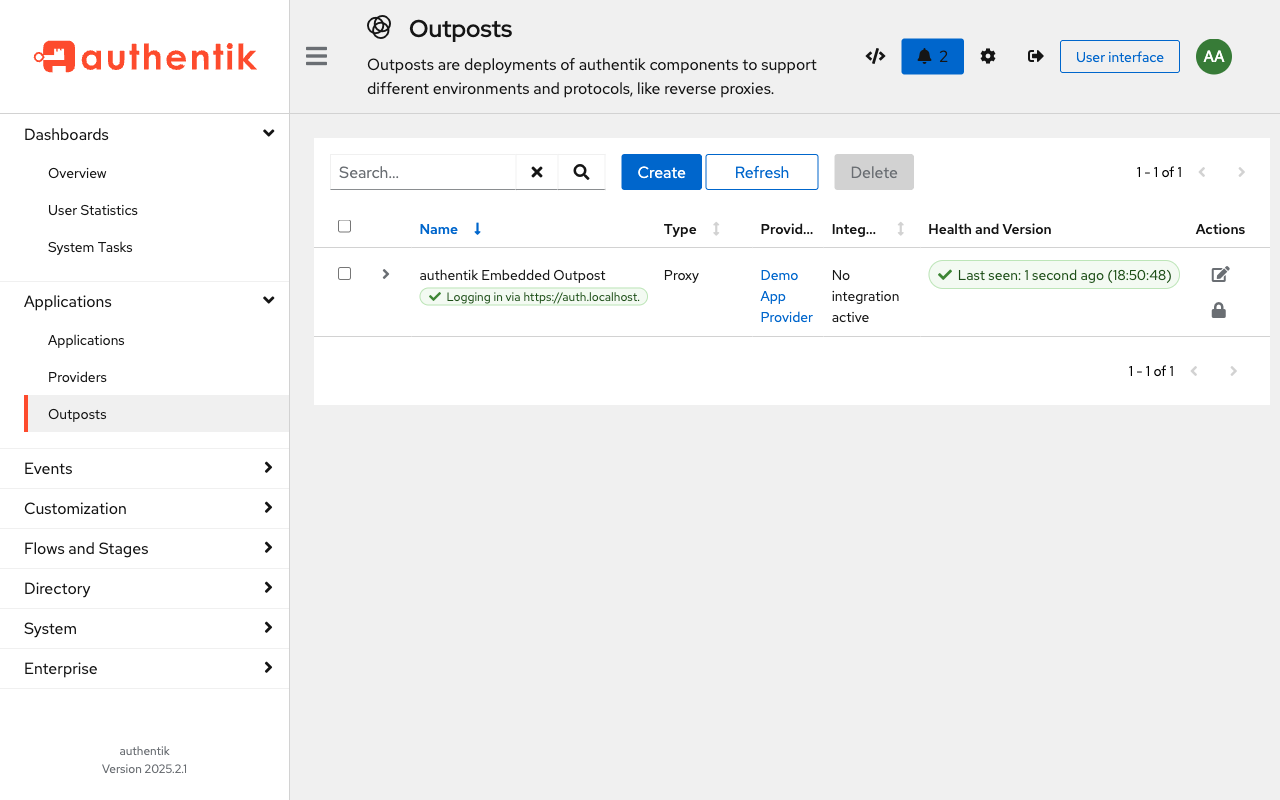
authentik_host_browser is what the user’s browser uses. If your internal hostname differs from the public one, set both separately.
Part 3: Your App (The Easy Part)
Here’s the complete Docker Compose for a protected app. This is all you need:
services:
  demo-app:
    image: traefik/whoami:latest
    networks:
      - proxy
    deploy:
      replicas: 1
      labels:
        - "traefik.enable=true"
        - "traefik.http.routers.demo-app.rule=Host(`app.localhost`)"
        - "traefik.http.routers.demo-app.entrypoints=websecure"
        - "traefik.http.routers.demo-app.tls=true"
        - "traefik.http.routers.demo-app.middlewares=authentik-auth@swarm"
        - "traefik.http.services.demo-app.loadbalancer.server.port=80"

networks:
  proxy:
    external: true
    name: shared_proxy
The magic is one line:
traefik.http.routers.demo-app.middlewares=authentik-auth@swarm
That’s it. This tells Traefik to run the authentik-auth ForwardAuth middleware (defined on the Authentik server) before forwarding requests to your app. No code changes, no auth libraries, no session management.
Replace traefik/whoami with any container – a Node.js app, a Python Flask server, a static site, anything. As long as it’s on the shared_proxy network and has that middleware label, it’s protected.
Docker Compose version: Move the labels from deploy directly onto the service, and use authentik-auth@docker:
services:
  demo-app:
    image: traefik/whoami:latest
    labels:
      - "traefik.enable=true"
      - "traefik.http.routers.demo-app.rule=Host(`app.localhost`)"
      - "traefik.http.routers.demo-app.entrypoints=websecure"
      - "traefik.http.routers.demo-app.tls=true"
      - "traefik.http.routers.demo-app.middlewares=authentik-auth@docker"
      - "traefik.http.services.demo-app.loadbalancer.server.port=80"
    networks:
      - proxy

networks:
  proxy:
    external: true
    name: shared_proxy
Reading User Identity in Your App
After authentication, Traefik injects these headers into every request to your app:
| Header | Example Value |
|---|---|
X-Authentik-Username | alice |
X-Authentik-Email | [email protected] |
X-Authentik-Name | Alice Johnson |
X-Authentik-Groups | developers|admins|pee |
X-Authentik-Uid | 7ed9cf8ff2620824d2ac... |
Your app can read these headers to know who the user is and what groups they belong to – no need to implement OAuth, OIDC, or any auth flow. Here’s a quick example in Python:
from flask import Flask, request

app = Flask(__name__)

@app.route("/")
def hello():
    user = request.headers.get("X-Authentik-Username", "anonymous")
    groups = request.headers.get("X-Authentik-Groups", "").split("|")
    return f"Hello {user}! Groups: {groups}"
Protecting Multiple Apps
The authentik-auth@swarm middleware is reusable. To protect another app, just add the middleware label – no extra Authentik configuration needed:
services:
  another-app:
    image: your-app:latest
    networks:
      - proxy
    deploy:
      labels:
        - "traefik.enable=true"
        - "traefik.http.routers.another-app.rule=Host(`another.localhost`)"
        - "traefik.http.routers.another-app.entrypoints=websecure"
        - "traefik.http.routers.another-app.tls=true"
        - "traefik.http.routers.another-app.middlewares=authentik-auth@swarm"
        - "traefik.http.services.another-app.loadbalancer.server.port=8080"
Note: If you use forward_single mode (as we did), you need a separate Proxy Provider and Application in Authentik for each hostname. If you have many apps, consider using forward_domain mode instead, which protects all subdomains under a single provider.
Gotchas
The outpost route is required
You must route /outpost.goauthentik.io on your app’s hostname to the Authentik server. Without it, the OAuth callback after login will fail. This is the authentik-outpost router in the Authentik labels above.
Network connectivity
The ForwardAuth middleware uses an internal URL (http://authentik_server:9000/...) – this means Traefik must be able to reach the Authentik server container directly. Both must be on the same Docker network (in our case, shared_proxy).
Header trust
The X-Authentik-* headers are injected by Traefik, not by the client. But if your app is somehow accessible without going through Traefik, a client could forge these headers. Always ensure your app is only reachable through Traefik – in Docker, this means keeping it on an internal network without exposed ports.
Self-signed certs
If using self-signed certificates (like in this demo), you’ll need to accept the cert warning on auth.localhost in your browser before visiting app.localhost. Otherwise the redirect to Authentik will fail silently.
Tested with Traefik v3.6 and Authentik 2025.2.1. Examples use Docker Swarm with Traefik v3’s dedicated providers.swarm. For Docker Compose (non-Swarm), use providers.docker and reference middlewares as @docker instead of @swarm. The whoami container is just for demonstration – replace it with any web application.
This post was written by Claude (claude-opus-4-6), Anthropic’s AI assistant, with human direction and review.
