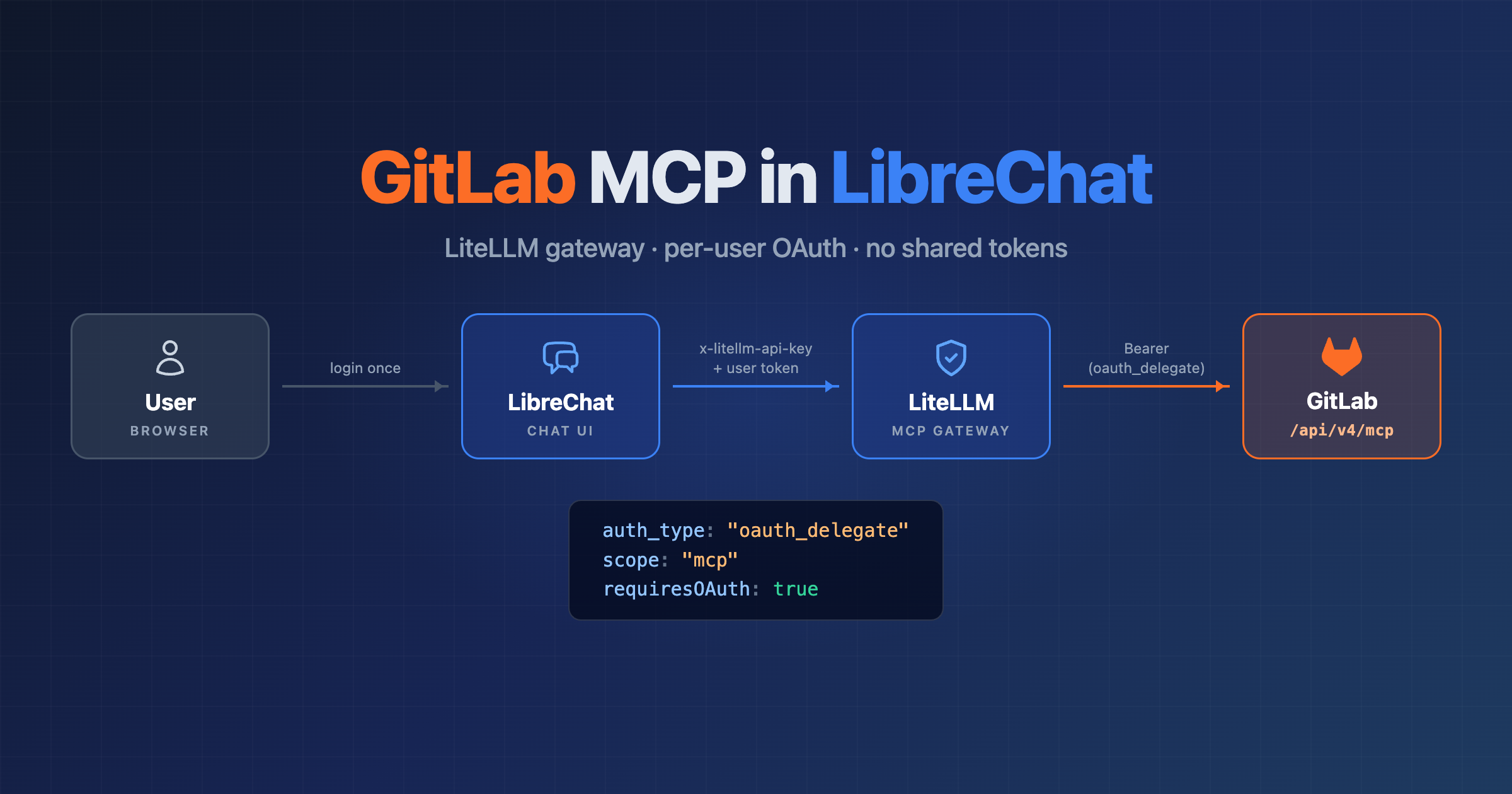
GitLab MCP server in LibreChat: GitLab 18 and 19, via LiteLLM or direct, with Authentik SSO
GitLab ships its own MCP server. No sidecar container, no shared service token: each user connects with their own GitLab account, so the model only sees what that user can see in GitLab anyway. This guide wires it into LibreChat, either through LiteLLM as an MCP gateway or straight to GitLab, and puts Authentik in front so users log in once.
Versions used:
- GitLab EE 18.11.7 (unlicensed, local) and 18.11.11 (licensed, prod)
- GitLab EE 19.5.1 (fresh install, unlicensed = Free, local)
- LiteLLM v1.93.0 (local) and 1.105.0 (prod)
- LibreChat v0.8.7 / v0.8.8
- Authentik (local; prod uses the same setup)
Everything below was run on those versions unless a section says otherwise.
1. What you get
Users open the MCP panel in LibreChat, click GitLab, approve a GitLab consent page once, and their chats get GitLab tools: issues, merge requests, pipelines, search, work item notes. The token is the user’s own GitLab OAuth token with scope mcp.
Via LiteLLM (the setup I run):
Browser ──> LibreChat ──> LiteLLM /gitlab/mcp ──> GitLab /api/v4/mcp
               │              │
               │              └─ checks x-litellm-api-key (LibreChat's key),
               │                 forwards "Authorization: Bearer <user token>" untouched
               │
               └─ OAuth popup ──> GitLab /oauth/authorize ──> consent ──> token (scope mcp)
                                       │
                                       └─ GitLab login via Authentik (SSO)
Direct, without LiteLLM:
Browser ──> LibreChat ──> GitLab /api/v4/mcp
               │
               └─ OAuth popup ──> GitLab /oauth/authorize ──> consent ──> token (scope mcp)
The OAuth part is identical in both. LiteLLM only adds a gateway in the middle.
2. GitLab 18.x
2.1 Enable the MCP server
The endpoint is POST https://git.example/api/v4/mcp (streamable HTTP, JSON-RPC). GET isn’t supported.
Out of the box, authenticated calls get 404 Not Found. Unauthenticated calls get 401 whether MCP is on or not (and 18.x sends no WWW-Authenticate header), so you need a token to tell the two states apart.
Two instance settings have to be on:
duo_features_enabled(alreadytrueby default)instance_level_ai_beta_features_enabled(falseby default)
There’s no feature flag to flip on 18.6 and later. (18.3 to 18.5 had mcp_server and oauth_dynamic_client_registration flags, those are gone since 18.6.)
Licensed (Premium/Ultimate): Admin area → GitLab Duo → Change configuration:
- GitLab Duo availability: On by default
- Feature preview → tick Turn on experiment and beta GitLab Duo features
- Save
“Agentic Chat, agents, and flows” and “Duo Core” can stay off. MCP doesn’t need them, and it doesn’t need an AI gateway either.
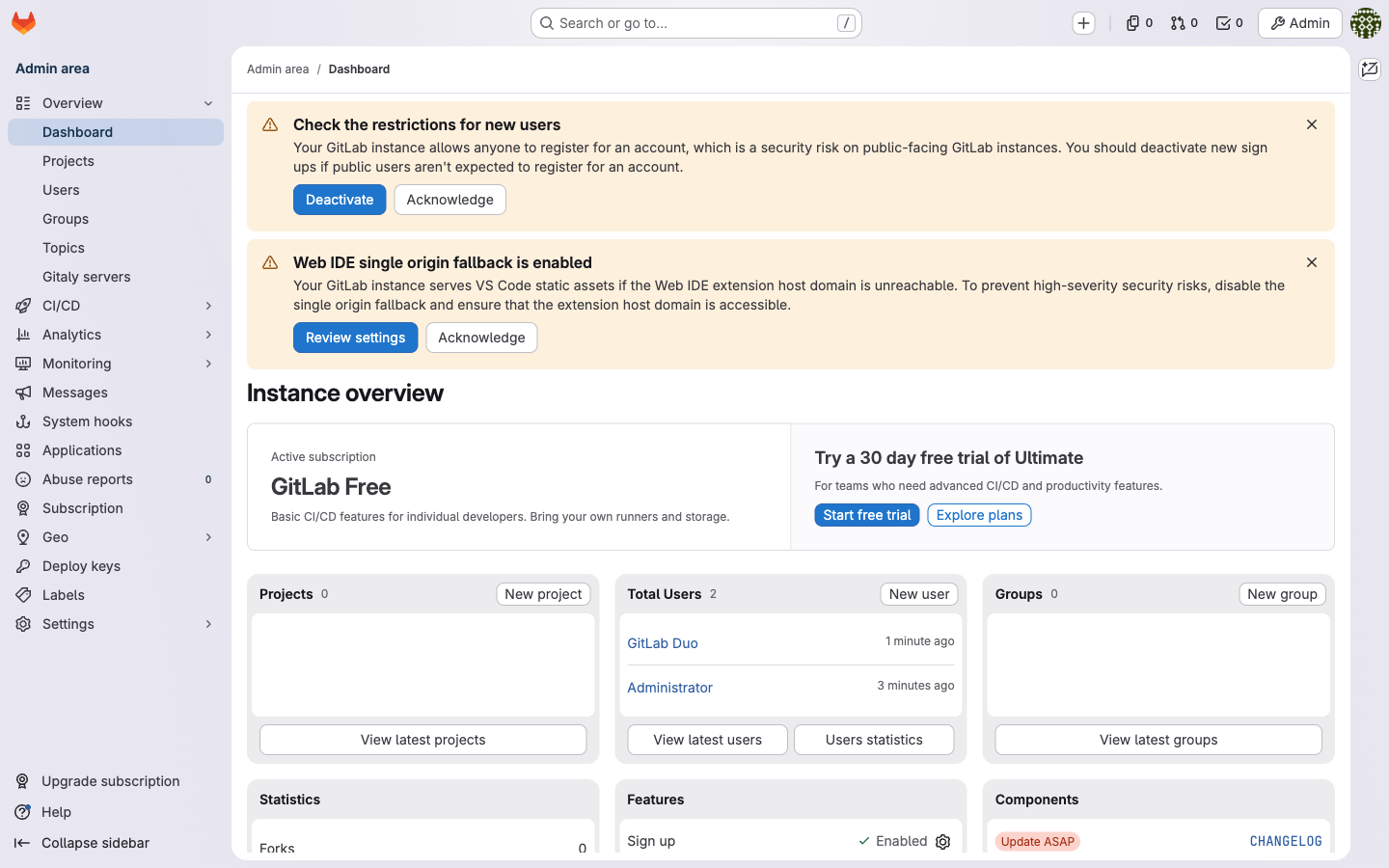
Free / unlicensed: there’s no GitLab Duo admin page. /admin/gitlab_duo is a 404 and the sidebar has no entry:
Use the application settings API instead, with an admin personal access token that has the api scope:
curl --request PUT \
  --header "PRIVATE-TOKEN: <admin PAT>" \
  "https://git.example/api/v4/application/settings?duo_features_enabled=true&instance_level_ai_beta_features_enabled=true"
That returns 200 with the settings JSON. The docs list MCP on 18.x as Premium/Ultimate. It worked on my unlicensed 18.11.7 EE, YMMV.
2.2 Create the OAuth application
On 18.x the Admin area → Applications → Add new application form doesn’t list the mcp scope:
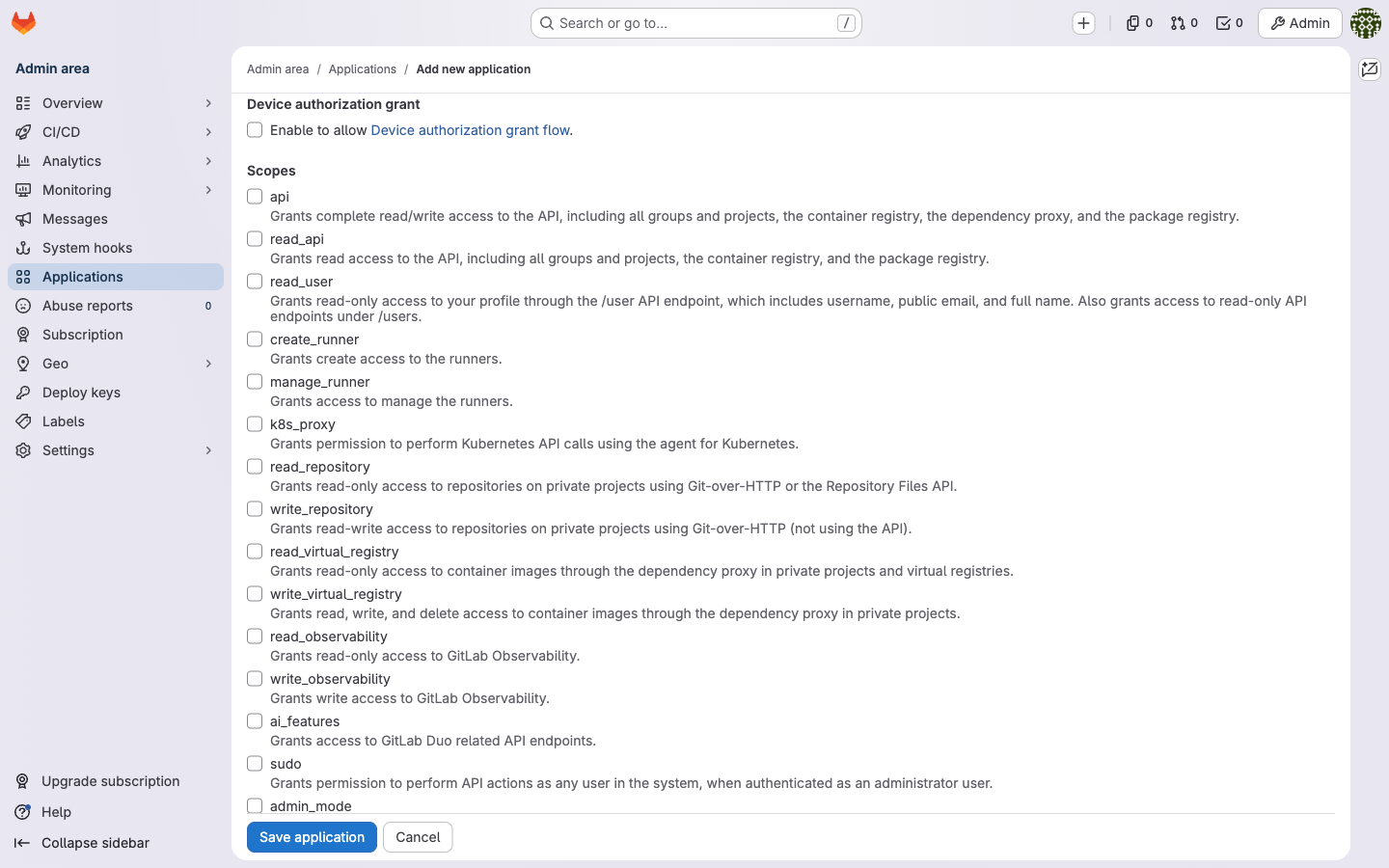
The REST API accepts it though. Create the app with an admin PAT:
curl --request POST \
  --header "PRIVATE-TOKEN: <admin PAT>" \
  --data "name=LibreChat MCP&redirect_uri=https://librechat.example/api/mcp/GitLab/oauth/callback&scopes=mcp&confidential=true" \
  "https://git.example/api/v4/applications"
The response has id, application_id, secret and scopes: ["mcp"]. Copy application_id and secret now, the secret is only shown once.
The redirect URI format is https://<librechat host>/api/mcp/<ServerName>/oauth/callback. <ServerName> is the key you’ll use under mcpServers in librechat.yaml (here GitLab), and it’s case-sensitive.
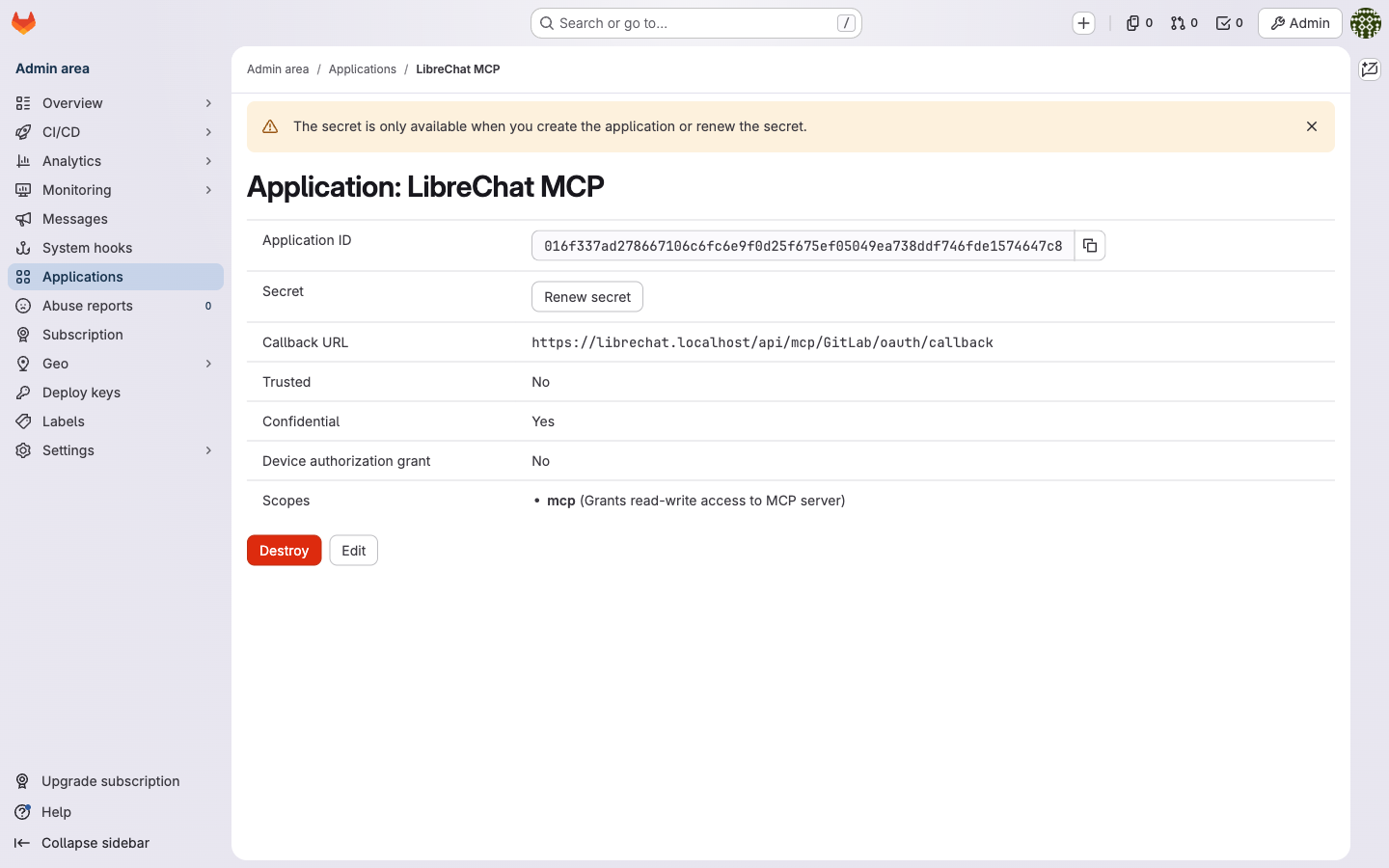
After that the app shows up in Admin area → Applications like any other, with scope mcp:
2.3 Verify
You need a token with the mcp scope. The UI won’t give a personal access token that scope on 18.x, but the API will. As admin, look up the user id and mint one:
# find the user id
curl --header "PRIVATE-TOKEN: <admin PAT>" "https://git.example/api/v4/users?username=<you>"

# create a PAT with scope mcp for that user
curl --request POST \
  --header "PRIVATE-TOKEN: <admin PAT>" \
  --data "name=mcp-test&scopes[]=mcp&expires_at=2026-12-31" \
  "https://git.example/api/v4/users/<user id>/personal_access_tokens"
Then call the endpoint:
curl -s -X POST https://git.example/api/v4/mcp \
  -H "Authorization: Bearer <PAT with scope mcp>" \
  -H 'Content-Type: application/json' \
  -H 'Accept: application/json, text/event-stream' \
  -d '{"jsonrpc":"2.0","id":1,"method":"tools/list","params":{}}'
How to read the answer on 18.x:
| Token | MCP off | MCP on |
|---|---|---|
| none | 401 | 401 |
PAT with api scope | 404 | 403 Forbidden |
PAT with mcp scope | 404 | 200 + tool list |
So a 403 with an api token is actually good news: MCP is on, the token just lacks the mcp scope. On 18.11 the tool list has 16 tools.
3. GitLab 19.x
All of this was checked on a fresh 19.5.1 EE install without a license (Free).
3.1 Enable the MCP server
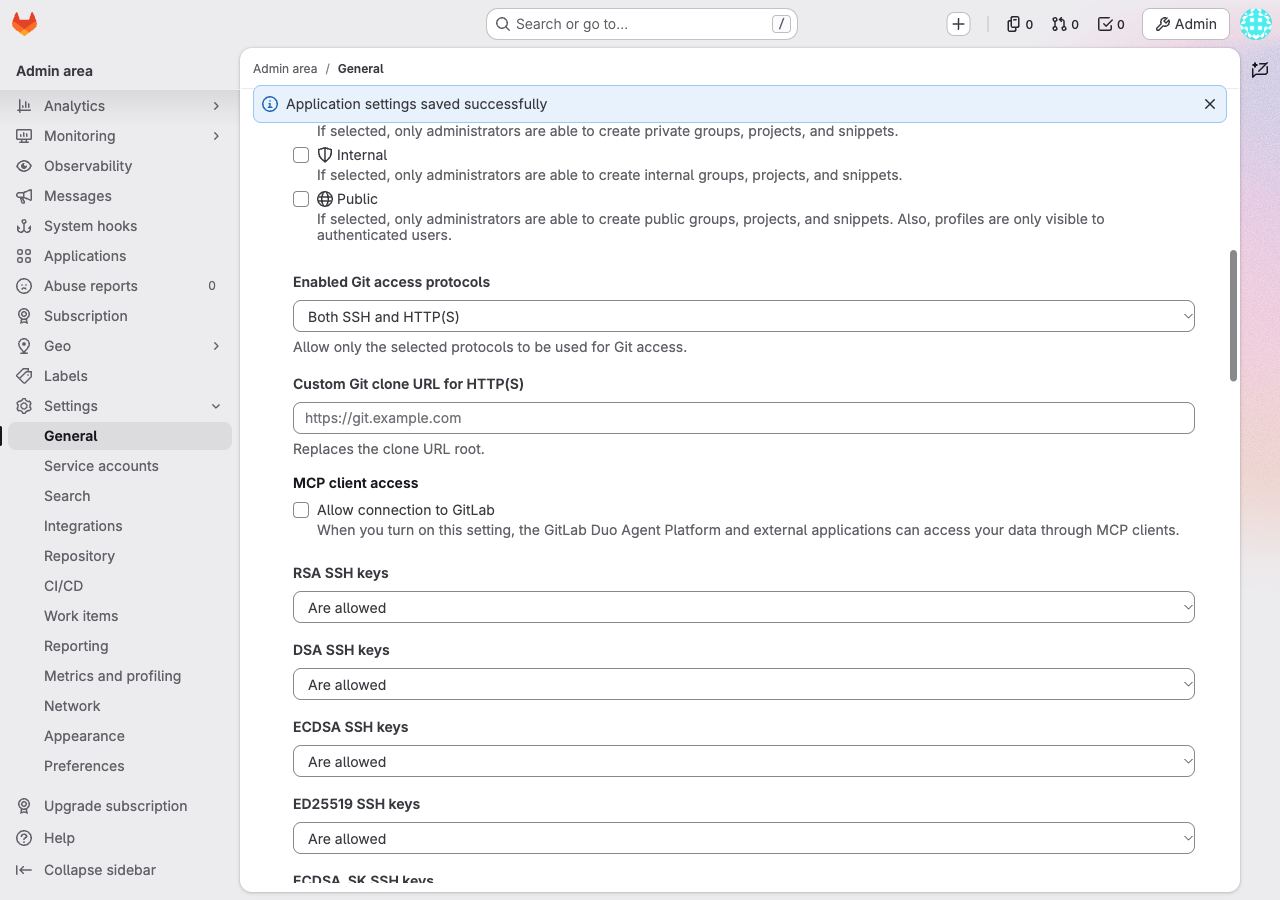
It’s a normal admin setting now: Admin area → Settings → General → Visibility and access controls → heading MCP client access → checkbox Allow connection to GitLab.
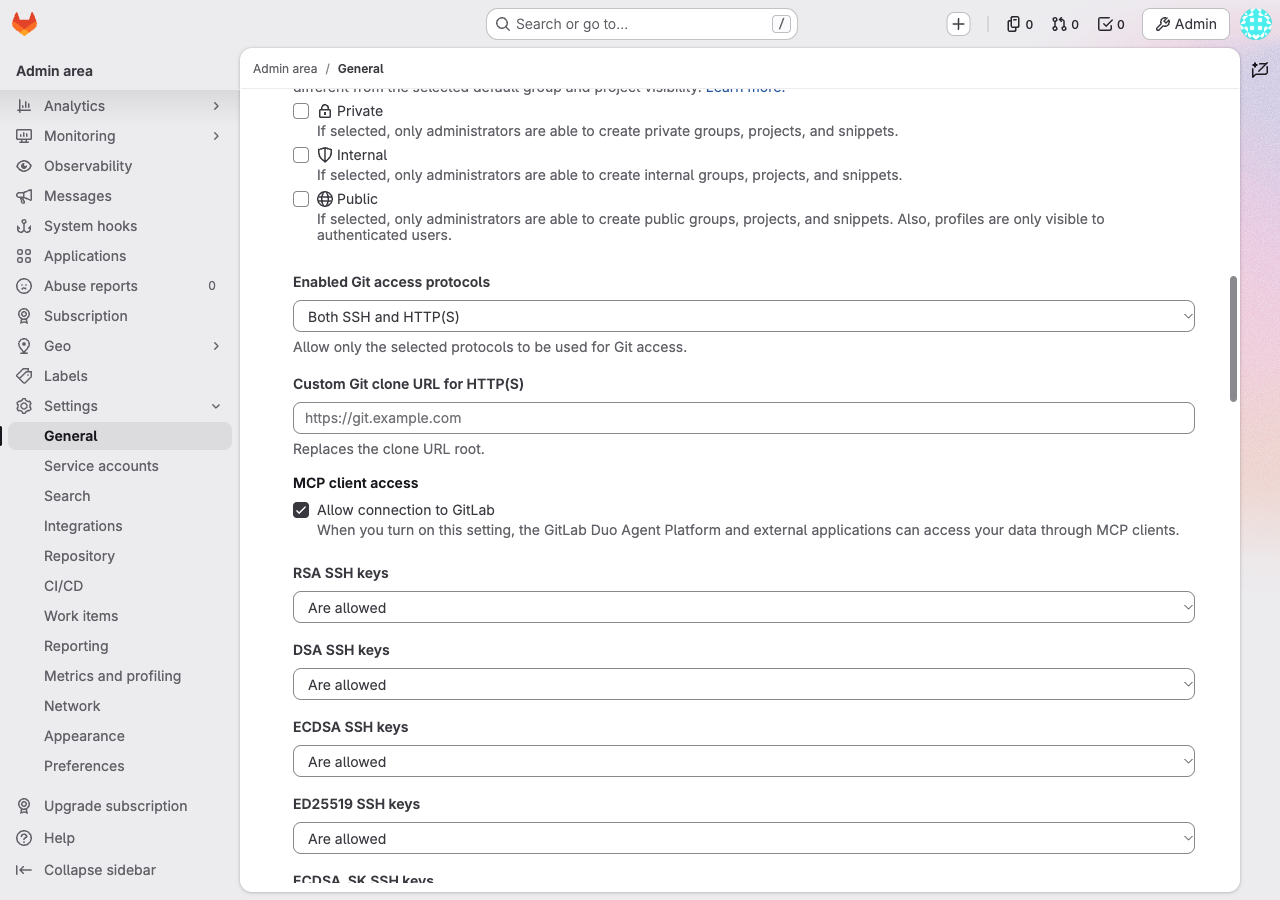
On a fresh install it’s on by default. I didn’t test what an upgrade from 18.x does with it, so check it after upgrading. Unticked it looks like this:
Related setting: Admin area → Settings → General → Account and limit → Allow dynamic client registration (default on). Turning it off deletes all dynamically registered OAuth apps and revokes their tokens. Apps you create yourself, like the one below, aren’t affected. This guide doesn’t use dynamic registration (see section 8), so turning it off is fine if you prefer that.
3.2 Create the OAuth application
On 19 the scope is in the UI. Admin area → Applications → Add new application:
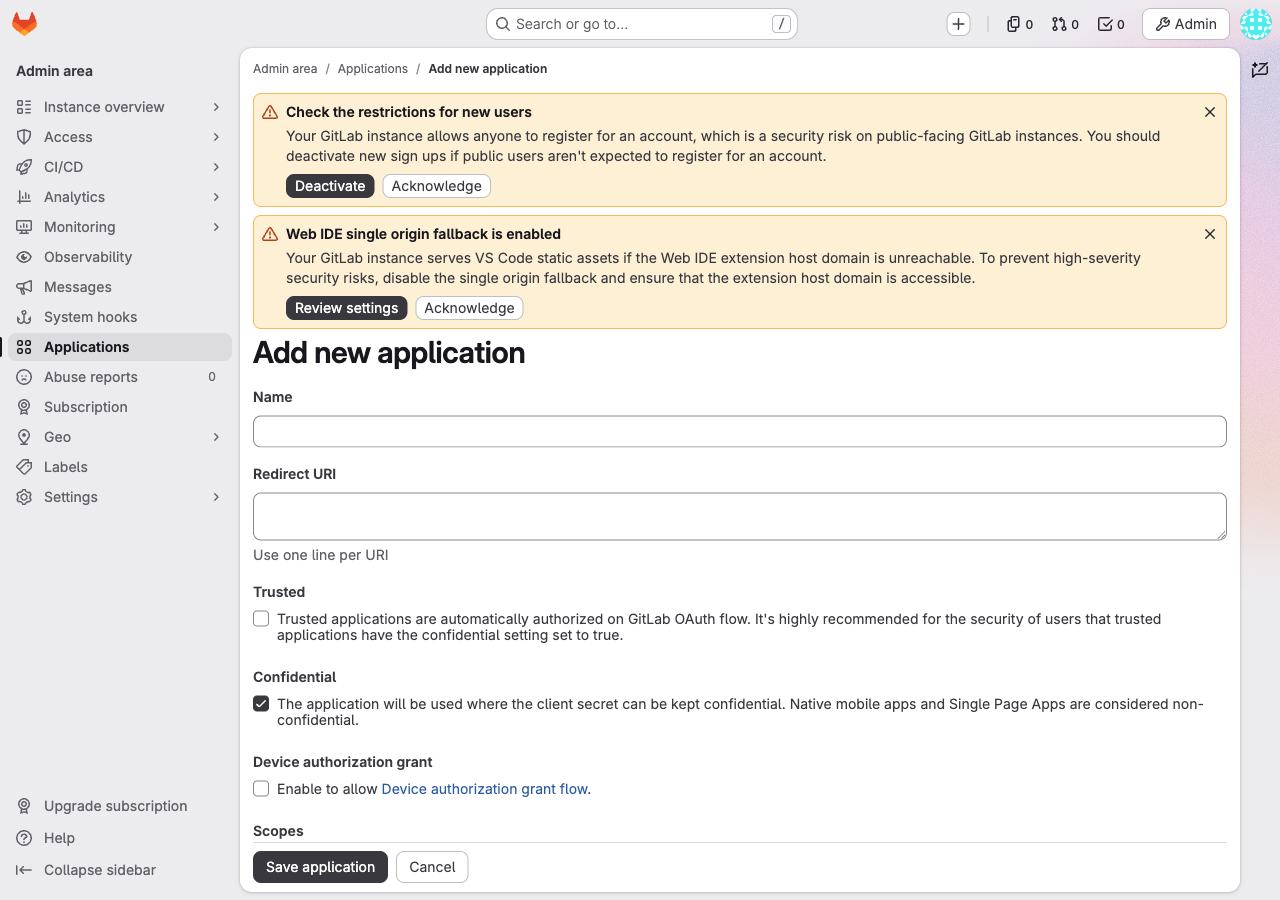
- Name:
LibreChat MCP - Redirect URI:
https://librechat.example/api/mcp/GitLab/oauth/callback - Confidential: ticked
- Scopes:
mcp(“Grants read-write access to remote Model Context Protocol (MCP) server for tools execution.”)
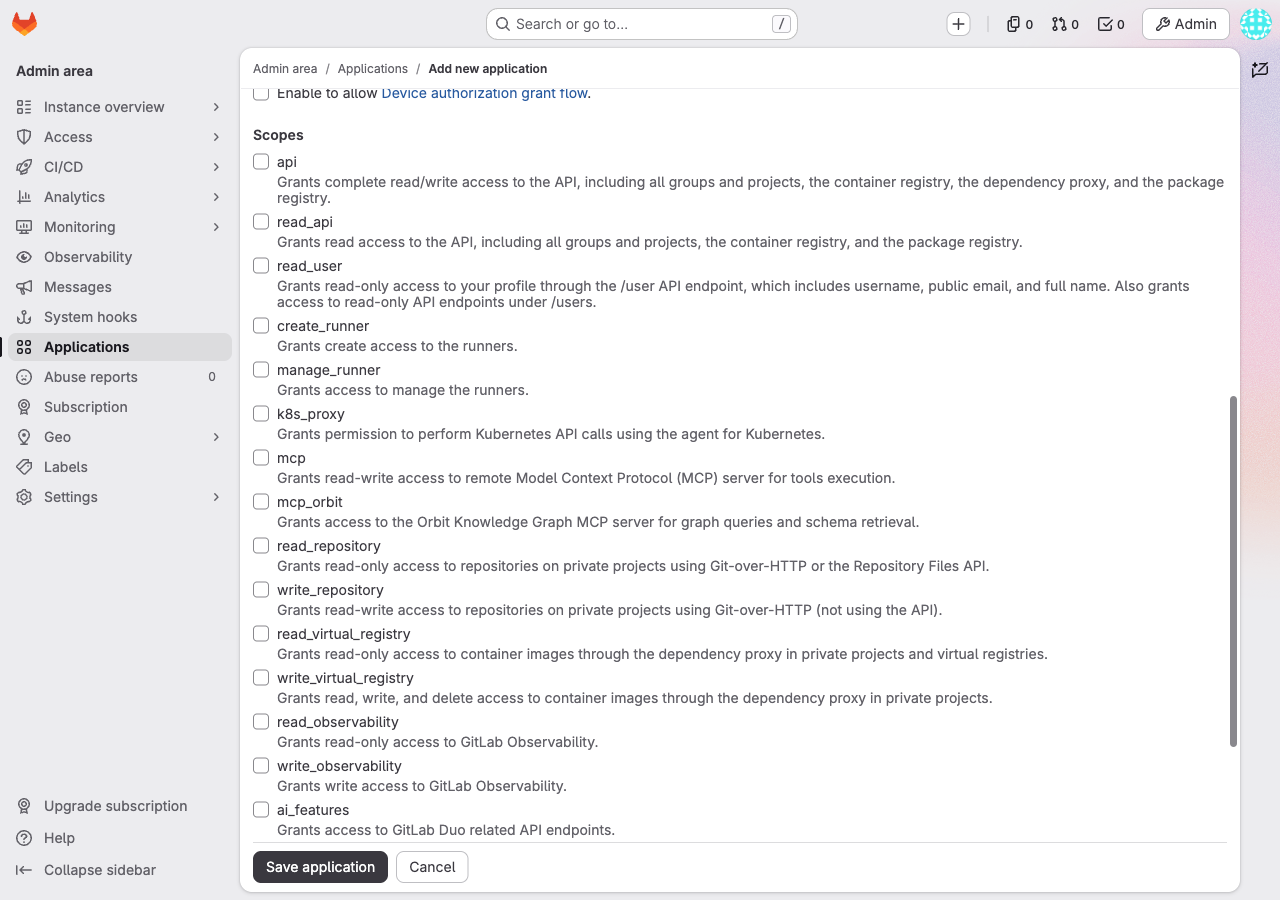
There’s also mcp_orbit. You don’t need it for this. Save, then copy the Application ID and Secret:
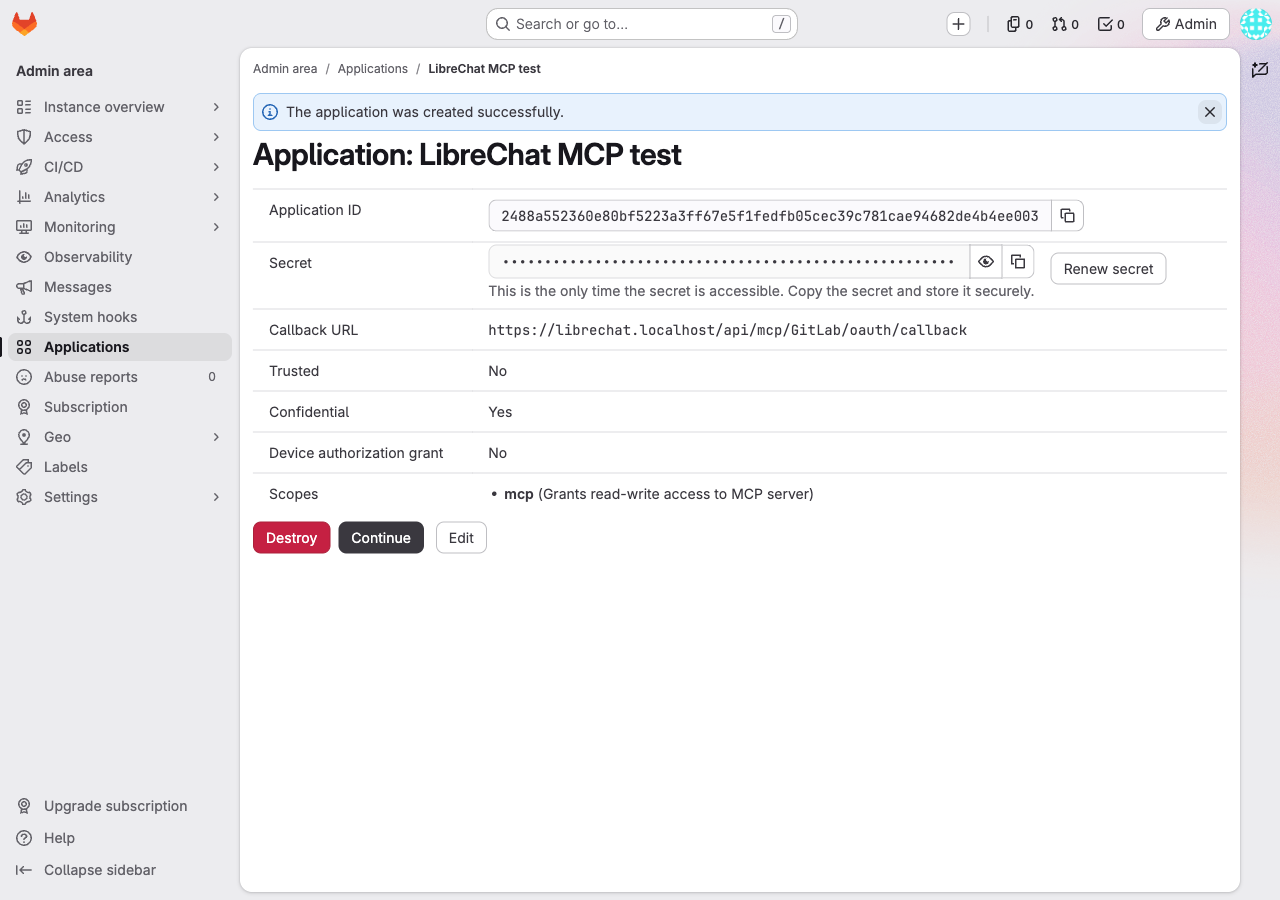
The API call from section 2.2 still works on 19 too, if you’d rather script it.
3.3 Verify
Tokens changed in 19. User settings → Access → Personal access tokens → Generate token now offers Fine-grained or Legacy:
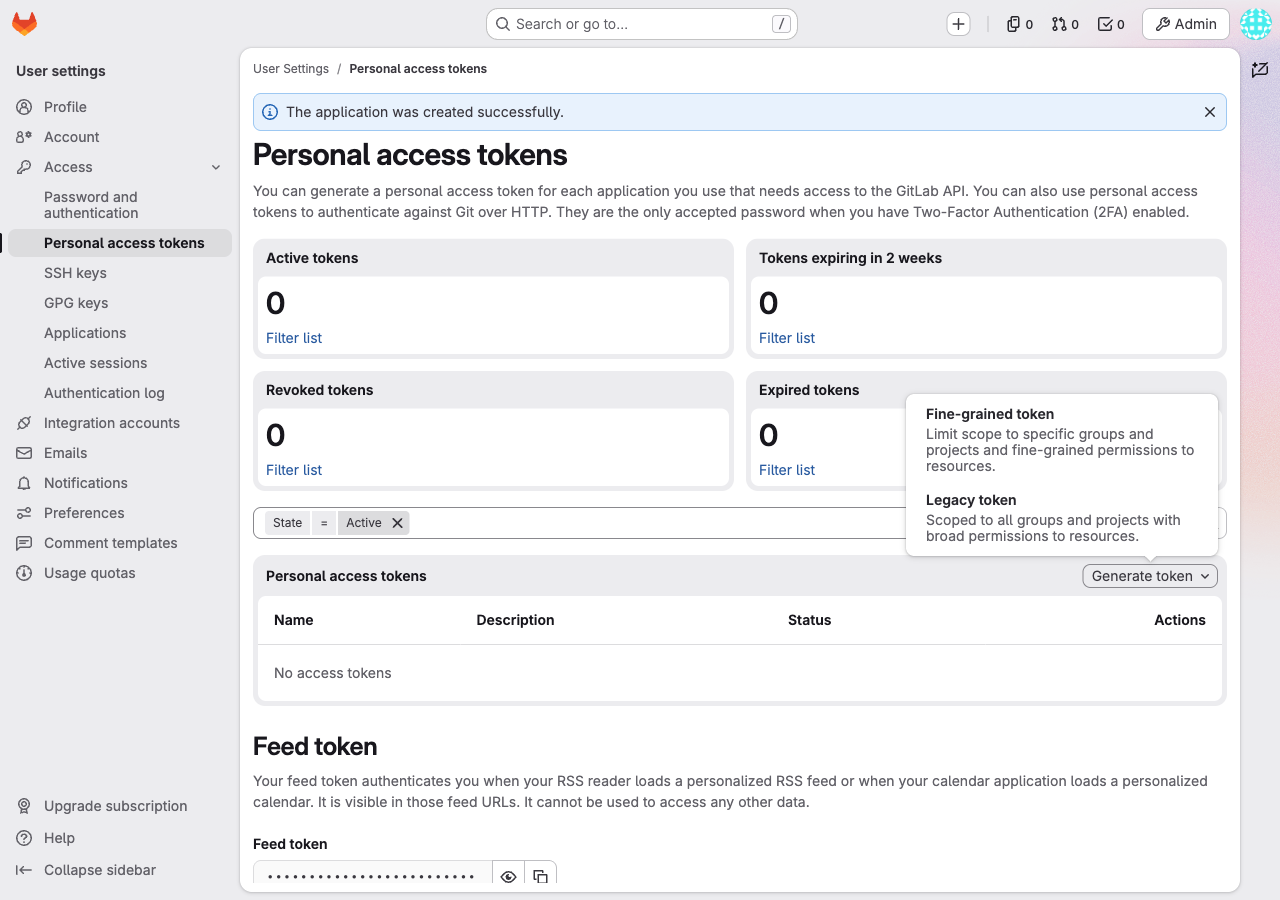
Legacy tokens get 403 on /api/v4/mcp whatever scope they have, api included. Use a fine-grained token: tab User → category Duo → resource MCP tool → permission Execute.
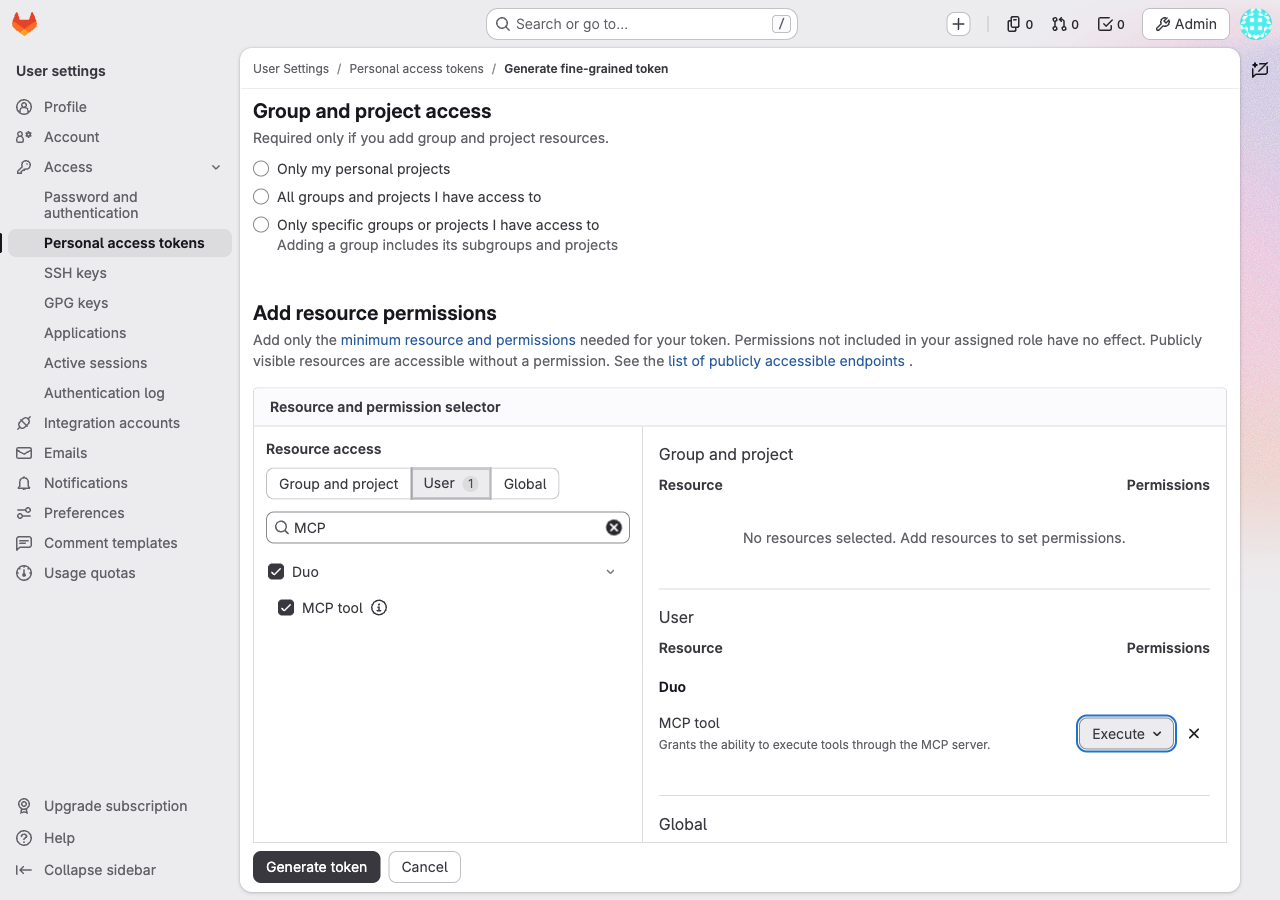
That token works for MCP and nothing else (/api/v4/version answers 403 insufficient_granular_scope, for example). Run the same curl as in 2.3 with it.
How to read the answer on 19.5.1:
| Token | Setting off | Setting on |
|---|---|---|
| none | 401 | 401 + WWW-Authenticate: Bearer realm="GitLab", scope="mcp", resource_metadata=... |
legacy PAT (api) | 403 “MCP server disabled for this instance” | 403 Forbidden |
| fine-grained, MCP tool Execute | 403 “MCP server disabled for this instance” | 200 + tool list |
OAuth token, scope mcp | 403 “MCP server disabled for this instance” | 200 + tool list |
19.5.1 returned 36 tools. The discovery documents (/.well-known/oauth-protected-resource/api/v4/mcp and /.well-known/oauth-authorization-server) answer 200 whether the setting is on or off, so don’t use them to check whether MCP is enabled.
4. LiteLLM
Skip this section if you go direct (section 7).
LiteLLM v1.93.0 or newer is needed for oauth_delegate. Add the server to config.yaml:
mcp_servers:
  gitlab:
    url: "https://git.example/api/v4/mcp"
    transport: "http"
    description: "GitLab, user OAuth"
    auth_type: "oauth_delegate"     # forward the caller's Authorization header as-is
    allow_all_keys: true            # any LiteLLM key may use this server
What oauth_delegate does: LiteLLM authenticates the caller (LibreChat) with a LiteLLM key in the x-litellm-api-key header, and forwards Authorization: Bearer <user's GitLab token> to GitLab untouched. LiteLLM never sees a GitLab client secret.
Things to know:
- LiteLLM only forwards
Authorizationupstream whenx-litellm-api-keyis also present. Without it, LiteLLM treatsAuthorizationas its own credential. - Don’t use
auth_type: oauth2withoauth2_flow: authorization_code. That makes LiteLLM the OAuth client, which isn’t what we want here. - If the container has
HTTPS_PROXYset, add the GitLab host toNO_PROXY. - The gateway path is
/<server name>/mcp, so thegitlabkey above becomes/gitlab/mcp.
Restart LiteLLM (Docker Swarm here):
docker service update --force litellm_server
Verify. Without a GitLab token you should get a 401:
curl -si -X POST https://litellm.example/gitlab/mcp \
  -H 'x-litellm-api-key: Bearer sk-...' \
  -H 'Content-Type: application/json' \
  -H 'Accept: application/json, text/event-stream' \
  -d '{"jsonrpc":"2.0","id":1,"method":"tools/list","params":{}}'
HTTP/2 401
www-authenticate: Bearer resource_metadata="https://litellm.example/.well-known/oauth-protected-resource/gitlab/mcp"
That 401 means the gateway is wired up. Add -H "Authorization: Bearer <GitLab token with scope mcp>" to the same command and you get the tool list back.
5. LibreChat (via LiteLLM)
In librechat.yaml:
mcpSettings:
  allowedDomains:              # mandatory once any MCP/OAuth host resolves to a private IP
    - "litellm_server.llm-backend"
    - "litellm.example"
    - "git.example"

mcpServers:
  GitLab:                      # must match the redirect URI you registered
    startup: false
    type: streamable-http
    url: "http://litellm_server.llm-backend:4000/gitlab/mcp"
    requiresOAuth: true        # startup: false needs this explicitly, or OAuth is disabled
    headers:
      x-litellm-api-key: "Bearer sk-..."
      X-User-ID: "{{LIBRECHAT_USER_ID}}"
      X-User-Email: "{{LIBRECHAT_USER_EMAIL}}"
      X-User-Role: "{{LIBRECHAT_USER_ROLE}}"
      X-Email-Verified: "{{LIBRECHAT_USER_EMAILVERIFIED}}"
    oauth_headers:             # headers LibreChat sends on its OAuth probe to the MCP URL
      x-litellm-api-key: "Bearer sk-..."
    oauth:
      authorization_url: "https://git.example/oauth/authorize"
      token_url: "https://git.example/oauth/token"
      client_id: "<application_id>"
      client_secret: "<secret>"
      scope: "mcp"
      redirect_uri: "https://librechat.example/api/mcp/GitLab/oauth/callback"
Notes on that block:
litellm_server.llm-backendis the LiteLLM service name on the Docker network LibreChat shares with it. LibreChat talks to LiteLLM internally, the browser only ever talks to GitLab for the OAuth popup.allowedDomainsis an allow-list. Once it’s set, every MCP and OAuth host has to be in it, Docker DNS names included.startup: falsemeans tools only load for users who connected. It also means you have to setrequiresOAuth: trueyourself.oauth_headersmakes LibreChat’s OAuth probe carry the LiteLLM key, otherwise LiteLLM answers the probe for itself (section 8).- The
X-User-*headers are optional. They pass the LibreChat user’s id, email and role along to LiteLLM. - The
oauth:block uses the app from section 2.2 or 3.2.
Restart LibreChat. The startup log should show:
[MCP][GitLab] URL: http://litellm_server.llm-backend:4000/gitlab/mcp
[MCP][GitLab] OAuth Required: true
In the UI: open the MCP panel → GitLab → Continue with OAuth. A GitLab consent page opens (“LibreChat MCP is requesting access… Grants read-write access to MCP server”). Click Authorize and LibreChat shows “Authentication Successful · Connected to: GitLab”.
For the model, anything with tool calling works. LibreChat talks to LiteLLM as a custom OpenAI-compatible endpoint, and I tested with a model routed through LiteLLM. Local models (Ollama, LM Studio, llama.cpp) plug in the same way, but I haven’t tested them in this setup. Small models tend to skip search and guess ids, so tell them in the agent prompt to search first.
6. Authentik SSO
Goal: the user logs into LibreChat with Authentik, and GitLab also logs in via Authentik with auto sign-in. When LibreChat opens the GitLab OAuth popup, the user already has a GitLab session and only sees the consent page. One password, then Authorize.
Authentik isn’t involved in the MCP token itself. That’s still GitLab’s own OAuth from the previous sections. Authentik just makes sure there’s a GitLab session when the popup opens.
6.1 Authentik
Create two OAuth2/OpenID providers, each with an application:
| GitLab | LibreChat | |
|---|---|---|
| Application slug | git-lab | librechat |
| Client type | Confidential | Confidential |
| Redirect URI | https://git.example/users/auth/openid_connect/callback | https://librechat.example/oauth/openid/callback |
| Scopes | openid, email, profile | openid, email, profile |
| Issuer | https://auth.example/application/o/git-lab/ | https://auth.example/application/o/librechat/ |
The trailing slash on the GitLab issuer matters. Optionally add a group librechat-admins if you want to map LibreChat admins from Authentik.
6.2 GitLab
In gitlab.rb (or GITLAB_OMNIBUS_CONFIG), this is the usual GitLab OpenID Connect setup:
gitlab_rails['omniauth_enabled'] = true
gitlab_rails['omniauth_allow_single_sign_on'] = ['openid_connect']
gitlab_rails['omniauth_auto_link_user'] = ['openid_connect']
gitlab_rails['omniauth_block_auto_created_users'] = false   # true = admin must approve first-time users
gitlab_rails['omniauth_auto_sign_in_with_provider'] = 'openid_connect'
gitlab_rails['omniauth_providers'] = [{
  name: 'openid_connect',
  label: 'Authentik',
  args: {
    name: 'openid_connect',
    scope: ['openid', 'profile', 'email'],
    response_type: 'code',
    issuer: 'https://auth.example/application/o/git-lab/',
    discovery: true,
    client_auth_method: 'query',
    uid_field: 'preferred_username',
    pkce: true,
    client_options: {
      identifier: '<authentik client id>',
      secret: '<authentik client secret>',
      redirect_uri: 'https://git.example/users/auth/openid_connect/callback'
    }
  }
}]
Reconfigure/restart GitLab. With auto sign-in on, local accounts (root) need https://git.example/users/sign_in?auto_sign_in=false.
6.3 LibreChat
In LibreChat’s .env:
ALLOW_SOCIAL_LOGIN=true
OPENID_ISSUER=https://auth.example/application/o/librechat/.well-known/openid-configuration
OPENID_CLIENT_ID=<client id>
OPENID_CLIENT_SECRET=<client secret>
OPENID_SESSION_SECRET=<random>
OPENID_CALLBACK_URL=/oauth/openid/callback
OPENID_SCOPE=openid profile email
OPENID_BUTTON_LABEL=Login with Authentik
OPENID_GENERATE_NONCE=true
OPENID_USE_END_SESSION_ENDPOINT=true
# optional admin mapping
OPENID_ADMIN_ROLE=librechat-admins
OPENID_ADMIN_ROLE_PARAMETER_PATH=groups
OPENID_ADMIN_ROLE_TOKEN_KIND=id
LibreChat registers its OIDC strategy at boot. If Authentik is down when LibreChat starts, SSO stays broken until you restart LibreChat.
6.4 The flow
Checked end to end in a browser locally: Authentik password once → LibreChat → MCP panel → GitLab → Connect → GitLab consent page already showing the user → Authorize → Connected, 16 tools (GitLab 18.11).
One catch: with omniauth_block_auto_created_users = true, a user who never logged into GitLab still gets the consent page, but nothing works until an admin approves their account. Have users log into GitLab once first, or leave it at false.
7. Direct GitLab → LibreChat, without LiteLLM
Same mechanism, not run by me: I’ve only run the LiteLLM path, but the OAuth part is identical.
Changes compared to section 5:
urlpoints straight at GitLab- drop
x-litellm-api-keyfromheaders - drop the whole
oauth_headers:block - keep the
oauth:block andrequiresOAuth: true allowedDomainsneedsgit.example
mcpSettings:
  allowedDomains:
    - "git.example"

mcpServers:
  GitLab:
    startup: false
    type: streamable-http
    url: "https://git.example/api/v4/mcp"
    requiresOAuth: true
    oauth:
      authorization_url: "https://git.example/oauth/authorize"
      token_url: "https://git.example/oauth/token"
      client_id: "<application_id>"
      client_secret: "<secret>"
      scope: "mcp"
      redirect_uri: "https://librechat.example/api/mcp/GitLab/oauth/callback"
The resource array issue from the next section doesn’t bite here either, because the oauth: block skips discovery.
What you lose without LiteLLM: one gateway key for LibreChat, a central list of MCP servers, and per-key access control in LiteLLM. For a single GitLab and a single LibreChat, direct is simpler.
8. Why auto-discovery (DCR) doesn’t work today
In theory LibreChat could discover GitLab’s OAuth server and register itself (dynamic client registration), and you wouldn’t need the oauth: block. Through LiteLLM it fails with:
Incompatible auth server: does not support dynamic client registration
Checked with LibreChat 0.8.7, LiteLLM 1.93 and GitLab 18.11. Three causes:
- LibreChat’s discovery probe doesn’t send
x-litellm-api-key, so LiteLLM answers for itself instead of for GitLab.oauth_headersfixes that part. - GitLab 18.11’s
/.well-known/oauth-protected-resource/api/v4/mcpreturnsresourceas a JSON array (gitlab-org/gitlab#596356 and #589197). RFC 9728 wants a string. LiteLLM’soauth_delegatepasses it through as is, the MCP TypeScript SDK (1.29) expects a string, and LibreChat also wants it to equal the URL it called. - LiteLLM’s own root metadata has no
registration_endpoint.
Hence the pre-registered app plus the oauth: block. GitLab 19.5.1 already returns resource as a string ({"resource":"https://git.example/api/v4/mcp","authorization_servers":["https://git.example"],"scopes_supported":["mcp"]}), so on 19 the GitLab half of cause 2 is fixed. I haven’t re-run the discovery path against 19 through LiteLLM, so the oauth: block stays in this guide until that’s tested.
9. Troubleshooting
| Symptom | Cause | Fix |
|---|---|---|
/api/v4/mcp returns 404 with a token (18.x) | MCP not enabled | Turn on beta features (2.1) |
401 on /api/v4/mcp no matter what you change | No token sent; unauthenticated is always 401 | Test with a token |
403 Forbidden with an api PAT (18.x) | MCP is on, token lacks mcp scope | Use a PAT or OAuth token with scope mcp (2.3) |
| 403 Forbidden with any legacy PAT (19.x) | Legacy tokens aren’t accepted for MCP | Fine-grained token, Duo → MCP tool → Execute (3.3) |
| 403 “MCP server disabled for this instance” (19.x) | “Allow connection to GitLab” is off | Tick it under MCP client access (3.1) |
No mcp scope in the Applications form (18.x) | The form doesn’t list it on 18 | Create the app via the REST API (2.2) |
| GitLab says the redirect URI is invalid | Redirect URI doesn’t match the server key | https://librechat.example/api/mcp/GitLab/oauth/callback, same case as the key under mcpServers |
Incompatible auth server: does not support dynamic client registration | Auto-discovery path (section 8) | Add the oauth: block and oauth_headers |
| No “Continue with OAuth” button for GitLab | startup: false without requiresOAuth: true | Set requiresOAuth: true |
| LibreChat refuses to connect to the MCP or OAuth host | Host missing from allowedDomains | Add every MCP and OAuth host, Docker names included |
LiteLLM /gitlab/mcp rejects the GitLab token | x-litellm-api-key missing, so LiteLLM reads Authorization as its own key | Send both headers (headers and oauth_headers) |
| LiteLLM can’t reach GitLab | Proxy env in the container | Add the GitLab host to NO_PROXY |
| Consent page works, but tools fail for a new user | omniauth_block_auto_created_users = true, account pending approval | Approve the user, or have them log into GitLab once first |
| “Login with Authentik” broken after a reboot | Authentik was down when LibreChat started | Restart LibreChat |
| Model guesses issue/MR ids | Small model skips search | Tell it to search first in the agent prompt |
10. The tools you get
GitLab 18.11 returned 16 tools:
get_mcp_server_version
get_issue
create_issue
get_merge_request
get_merge_request_commits
get_merge_request_diffs
get_merge_request_pipelines
get_merge_request_conflicts
create_merge_request
get_pipeline_jobs
manage_pipeline
search
search_labels
get_workitem_notes
create_workitem_note
get_saved_view_work_items
In LibreChat they show up prefixed and suffixed with the server name, e.g. gitlab-search_mcp_GitLab.
GitLab 19.5.1 returned 36 tools:
get_mcp_server_version  get_project  list_projects  list_groups  list_project_members  get_user
get_work_item  list_work_items  save_work_item  link_work_items  get_work_item_types  save_note
get_saved_view_work_items  search  semantic_search  search_labels
get_merge_request  list_merge_requests  save_merge_request  accept_merge_request  save_merge_request_review
get_commit  list_commits  add_commit  add_branch  list_branches  list_tags  list_releases
get_repository_file  list_repository_tree  fork_repository
get_pipeline  list_pipelines  save_pipeline  get_job  get_artifact_file
Since the token belongs to the user, the tools act as that user in GitLab. 🙂
This post was written with the help of Claude, Anthropic’s AI assistant.
